
IHSS EVV Mobile App
CalHHS OTSIMedical
4.4493.00 Reviews
- Version
- 1.7.0
- Installs
- 100.00K
- Age Rating
- Everyone
Screenshots
Our Review of IHSS EVV Mobile App
 Analysis by Appyee
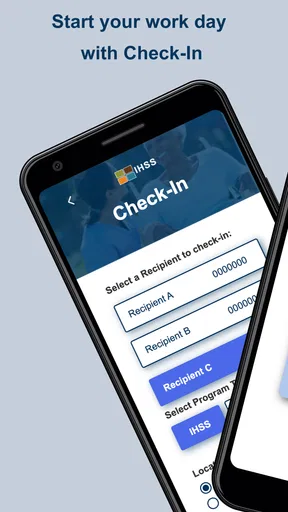
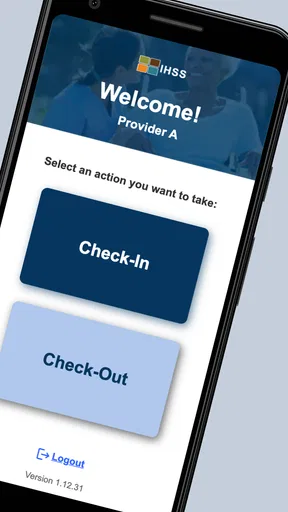
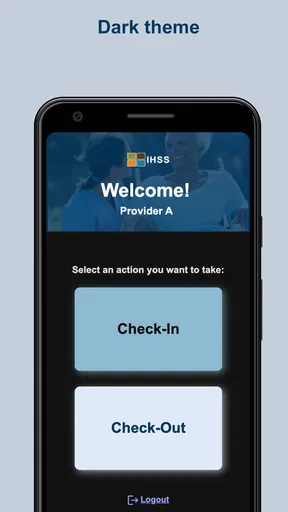
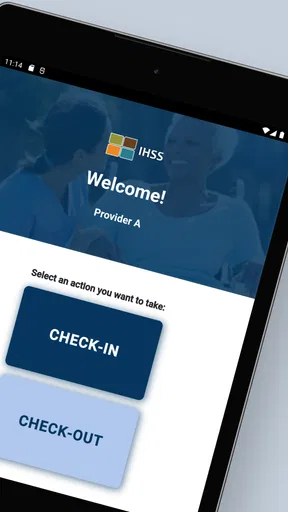
IHSS EVV Mobile App is the kind of medical utility I would judge less by appearance and more by whether it helps a provider complete a required work record without unnecessary confusion. Designed for California’s IHSS and WPCS providers, it handles the basic check-in and check-out task through a phone rather than asking users to rely on paper notes or a separate routine. That narrow purpose is also its main strength: the app is focused on a real administrative step instead of trying to become a general health platform.
I found it most relevant for people who already participate in California’s In-Home Supportive Services or Waiver Personal Care Services programs and need a mobile way to record service visits. It is not a wellness tracker, appointment manager, medication reminder, or patient portal. If your work does not involve those programs, there is little reason to install it. For the people it targets, however, a simple check-in and check-out tool can remove a surprisingly common source of end-of-day stress.
The app is free, carries an Everyone age rating, and comes from CalHHS OTSI. Its current release is version 1.7.0, and it supports devices running Android 7.0 or later. Those details make it approachable for users with older Android phones, although compatibility alone does not guarantee that every phone will behave identically. The service still depends on the device, its connection, and the account or program setup behind the app.
Getting past the first points of friction
The first difficulty is often not the check-in itself but knowing whether everything around it is ready. A provider may open the app expecting an immediate action, then discover that an account, participant relationship, or program arrangement needs to be in place first. That can feel like an app failure when the real issue is that the mobile tool is only one part of a larger EVV process.
I recommend treating the first launch as a setup check rather than waiting until the start of a busy visit. Keep your sign-in details available, confirm that the phone has a stable connection, and make sure the device has enough battery for the entire shift. These are ordinary precautions, but they matter more here than in a casual app because a missed work record can require extra follow-up.
It is also worth checking that you are using the intended provider workflow. IHSS EVV Mobile App is built around providers checking in and checking out, so it should not be approached like a client-facing medical application. If you are a recipient, family member, supervisor, or someone trying to review a broader case record, the mobile tool may not be the right place for that task.
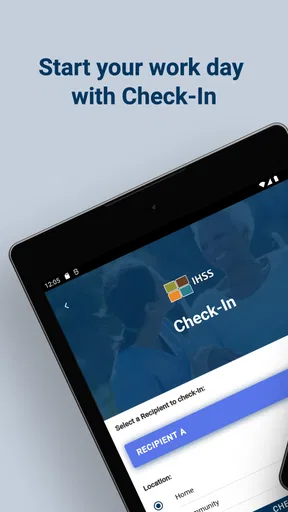
The most useful habit is to verify the visit context before tapping the final action. Take a moment to confirm that the selected person or service situation matches the visit you are beginning. A fast tap is convenient only when the correct context is already visible. When several visits or responsibilities are close together, slowing down for that small check can prevent a much larger correction later.
What to check before a visit begins
Before relying on the app for a scheduled service period, I would open it while there is still time to solve a problem. Confirm that you can reach the sign-in screen, that your account is accepted, and that the relevant check-in path is available. This is a better test than waiting until you are standing at the door or already under time pressure.
Keep the phone’s date and time settings ordinary and consistent rather than changing them to influence a record. Also avoid switching repeatedly between several devices during the same work routine unless your program instructions specifically allow it. A predictable device pattern makes it easier to tell whether a problem comes from the app, the phone, or the account.
If the application has just been updated, open it before the visit and look through the normal path once. The developer has released version 1.7.0, and updates can alter small details such as button placement or the way a screen loads. I would not wait until a critical check-in to discover that a familiar control has moved.
Another practical step is to keep the app easy to find. Put it on the home screen and avoid burying it in a folder with unrelated applications. This sounds minor, but a focused tool is most helpful when it can be opened quickly and consistently. The fewer distractions between arriving and recording the visit, the less likely it is that the task gets postponed.
When a check-in or check-out does not go as expected
If a button appears unresponsive, I would first wait briefly rather than tapping it repeatedly. Repeated taps can create uncertainty about whether the action was accepted, especially when a screen is slow to refresh. Check what the app currently shows, then close and reopen it only if the screen clearly has not changed.
A weak connection is another reasonable first suspect. Move to a place with better reception or a trusted Wi-Fi connection if that is available and appropriate. Then try the action again once, paying attention to the result. I would avoid guessing at a workaround that creates duplicate entries, because repairing an uncertain record is usually more difficult than documenting exactly what happened.
Restarting the phone is a sensible general troubleshooting step when the whole device is behaving strangely. It can clear a temporary problem without changing the underlying account or visit information. I would not immediately erase app data or uninstall the application, however. Those actions can remove local state or create a new setup task, and they should be considered only when official guidance calls for them.
If the app closes, freezes, or returns to the sign-in screen, write down the time, the action you were attempting, and the message you saw. A short factual note is more useful than simply remembering that “it did not work.” If support or a program contact needs to investigate, those details help separate a connection issue from an account issue or a broader service problem.
Recovering the daily workflow without guessing
The most realistic scenario is a provider arriving for a visit, opening the app, and discovering that the expected screen is not ready. My approach would be calm and sequential: confirm the connection, check that the correct account is being used, reopen the app if necessary, and try the intended action once more. I would then record the exact time and outcome for my own notes rather than repeatedly experimenting.
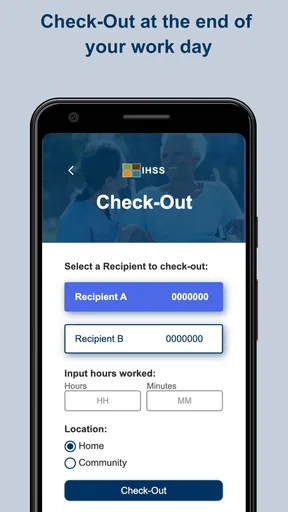
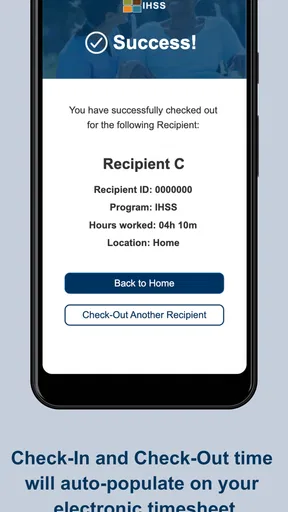
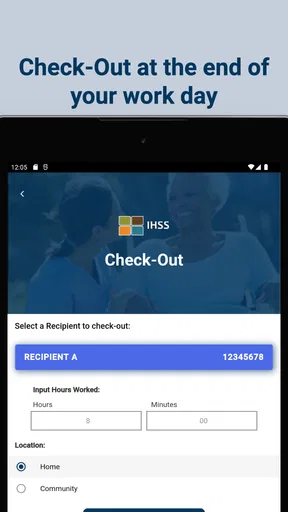
At the end of a visit, the same discipline applies to check-out. Do not assume that leaving the location automatically completes the record, and do not rely on memory to reconstruct the event later. Open the app, follow the normal check-out route, and verify that the action appears to have completed. The value of an EVV tool is tied to the accuracy of the routine, not merely to having the app installed.
For people who move between several clients or service periods, a small personal checklist can help. I would use a simple sequence: open the app, confirm the visit context, perform the action, observe the confirmation or resulting screen, and note any irregularity. This is not a replacement for official instructions; it is a way to reduce rushed mistakes when the day becomes busy.
One trade-off is that a mobile workflow can feel less forgiving than paper. With paper, you can write a note immediately and sort it out later, although that creates its own accuracy problems. With the app, the expectation is that the event is recorded through the designated process at the relevant point in the visit. That is better for a structured record, but it means the provider must take connection and device readiness seriously.
Another trade-off is simplicity versus flexibility. Because this app is centered on IHSS and WPCS EVV actions, it is easier to understand than a broad care-management platform once the correct setup is in place. At the same time, it is not designed to replace every administrative tool a provider may use. I would keep other required records and communication channels separate rather than expecting this one app to cover them.
Separating an app problem from a program problem
Not every failed action originates on the phone. An account may not be ready, a provider relationship may need attention, or the visit context may not be available through the expected workflow. In those cases, reinstalling the app will not solve the underlying issue. This distinction is important because repeated local troubleshooting can waste time while the real correction belongs with the relevant program or support contact.
I would look for clues in the pattern. If the app opens normally but a particular provider or service situation is missing, that points more toward setup or account context than a damaged installation. If the entire app fails to load, the phone or connection becomes a more plausible suspect. If other apps also cannot connect, the issue is probably broader than this medical utility.
Privacy and safety also deserve practical attention. This is a work-related health-services tool, so I would avoid sharing sign-in details, handing an unlocked phone to someone else, or taking screenshots that expose more information than necessary. Those are common-sense precautions rather than special features, but they are especially relevant when a phone is used for both personal and provider tasks.
Users should also remember that an app rating is not a substitute for a successful personal test. IHSS EVV Mobile App has a 4.4 average from around 1.2 thousand ratings, with over 100 thousand installs, which suggests that many people find it useful. Still, your experience can depend on your device, account status, connection, and familiarity with the required workflow. I would install it early, test the normal path, and resolve uncertainty before relying on it for an important visit.
Who will benefit and who should choose something else
This is a good fit for an IHSS or WPCS provider who wants the designated California EVV task available on a phone and prefers a focused workflow over a collection of unrelated functions. It is especially practical for someone who works away from a desk and needs to handle check-in and check-out as part of the visit itself.
I would be more cautious about recommending it to a person who expects detailed scheduling, messaging, payroll calculation, clinical notes, or general case management. Those expectations belong to a broader category of software. A dedicated EVV app can record the required event while still leaving many other parts of a provider’s work outside its scope.
It may also be a poor choice for someone whose phone is unreliable, frequently offline, or shared among several people. The app can be free and compatible with an older Android operating system, yet the surrounding routine can still be inconvenient if the device is not dependable. In that situation, improving the phone setup or following the program’s approved alternative process may be more useful than repeatedly blaming the application.
Compared with paper notes, this mobile approach is more structured and less dependent on remembering details later. Compared with a full care-management platform, it is narrower and likely easier to keep focused on the EVV action. That middle ground is exactly why I see value in it: it does one important job without pretending to replace the rest of a provider’s toolkit.
My practical verdict after using it
IHSS EVV Mobile App earns my recommendation for its intended audience, with one condition: treat setup and routine verification as part of using it, not as optional preparation. The app is free, focused, and built by CalHHS OTSI for a specific California provider workflow. Its 4.4 average and established install base make it look dependable enough to try, but the real test is whether your account and visit context are ready when you need them.
I like the fact that the purpose is clear. A provider does not have to search through a crowded wellness dashboard to find the relevant action. The limitation is equally clear: when something goes wrong, the cause may sit outside the app, and the narrow design offers little help for unrelated administrative needs.
My advice is to install it before the first critical visit, complete a calm setup check, and create a short personal sequence for confirming each action. If the app opens, the correct workflow is available, and your connection is stable, it can become a straightforward part of the workday. If the problem concerns account readiness or program records, move quickly to the appropriate support route instead of repeatedly reinstalling.
For California IHSS and WPCS providers, that balance makes it a useful practical tool rather than an all-purpose solution. I would use it for the EVV responsibility it was designed to handle, keep expectations realistic, and rely on other approved resources for everything beyond check-in and check-out.
Verdict
Strengths of IHSS EVV Mobile App
- Quick mobile check-in and check-out for IHSS service visits.
- Supports electronic visit verification requirements for caregivers.
- Can record visit details directly from a smartphone.
- Reduces paperwork and manual timesheet handling.
- Useful for documenting services while working in the field.
Limitations of IHSS EVV Mobile App
- Requires a stable internet connection for reliable visit reporting.
- Location and time tracking may raise privacy concerns for some users.
- App performance can depend on phone model and operating system.
- Login or verification issues may delay submitting visit information.
- Limited usefulness for users who do not provide IHSS services.
Similar Picks in This Category
View All
WebMD: Symptom Checker
WebMD, LLC4.1

Microphone Amplifier
DOSA Apps4.2

Anatomy Learning - 3D Anatomy
3D Medical OU4.5

Period Tracker and Calendar
SimpleInnovation4.9

GoodRx: Prescription Coupons
GoodRx4.8

CVS Health
CVS Pharmacy4.5
Frequently Asked Questions
What is the IHSS EVV Mobile App used for?
The IHSS EVV Mobile App is designed to help In-Home Supportive Services (IHSS) providers electronically record and manage their service visits. Depending on the program and region, providers may use it to clock in and out, confirm the recipient and service location, review visit details, and submit required electronic visit verification information to the appropriate system.
Who can use the IHSS EVV Mobile App?
The app is generally intended for authorized IHSS providers who are required to report their service hours through Electronic Visit Verification. Access may depend on enrollment, county or state participation, an active provider record, and valid login credentials. Recipients, case workers, and other users may have different systems or permissions, so eligibility should be confirmed with the official IHSS support channel.
What information or permissions does the app require?
During setup, the IHSS EVV Mobile App may request permission to use features such as location services, mobile data, notifications, and possibly the device camera or other verification tools. These permissions support visit validation and communication with the service system. Users should review the app’s privacy information and enable only the permissions needed for their assigned duties.
Can I use the app without an internet connection?
Availability of offline features can vary by version, device, and program configuration. Some EVV applications may allow limited visit information to be captured temporarily and synchronized when connectivity returns, while others require an active connection for clock-in or clock-out. Providers should not assume an offline entry was accepted and should verify the visit status after reconnecting.
What should I do if I cannot log in or the visit information is incorrect?
If login fails, first check your credentials, internet connection, app version, and device settings, then try restarting the app. For incorrect visit details, missing punches, rejected entries, or location problems, avoid creating duplicate records unless instructed. Contact your county IHSS office, EVV help desk, or authorized payroll support and keep any confirmation numbers or screenshots.
